Geppista Typeface: A Handmade Script for Invitations and Branding
I was sitting at my desk last Tuesday, surrounded by a chaotic spread of matte black cardstock, gold foil stickers, and half-empty coffee mugs. I was trying to finalize the branding for a new line of wedding invitations, and I had been staring at the same clean, geometric sans serif font for three hours. It looked professional, sure, but it felt cold. It lacked that personal touch—the "handwritten" feel that makes a couple feel like their stationery was actually made just for them. That’s when I pulled up Geppista, a script typeface from Script Amp, and decided to test it out on a few mockups.
If you are a crafter, a handmade seller, or someone who creates printables for Etsy, you know that the difference between a good product and a bestseller often comes down to those tiny details in typography. Geppista isn’t just another generic brush script; it has a distinct personality. It features a handmade signature style with what the designers call a "dancing baseline." This means the letters don’t sit perfectly flat on an invisible line; they sway and flow naturally, mimicking the rhythm of real handwriting. After testing this font on everything from candle labels to digital greeting cards, here is how it performs in the real world of small business creation.
The Visual Personality of Geppista
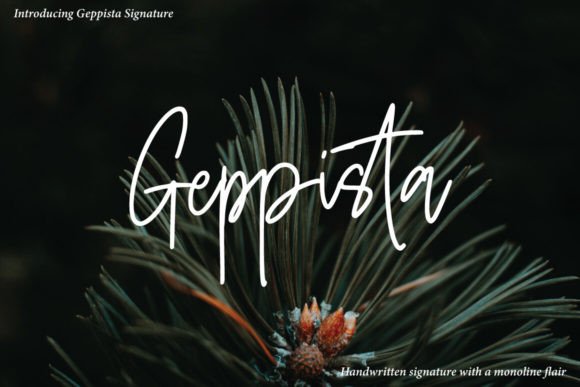
When you first look at Geppista, the first thing you notice is its elegance mixed with approachability. It falls squarely into the category of a premium display font, designed to be seen rather than read in paragraphs. The strokes vary in thickness, giving it that authentic hand-lettered vibe, but unlike some messy brush scripts, the letterforms remain clear and legible. This balance is crucial for product makers. You want your brand to feel artistic, but you also need customers to be able to read your shop name or product title without squinting.
The "dancing baseline" mentioned in the product description is more than just a marketing term. In practice, it adds movement to your designs. When I placed the word "Blessing" in Geppista on a rustic wooden sign mockup, the slight upward tilt at the end of the word gave it a sense of optimism and warmth. It feels alive. For creators selling seasonal products—like Christmas tags, birthday party banners, or holiday greeting cards—this inherent energy can elevate a simple design into something memorable. It brings a human element to digital files, which is essential for building trust with buyers who value authenticity.
Real-World Applications for Makers and Sellers
I’ve been using Geppista across various product categories to see where it shines. Here is a breakdown of how it performed in my recent projects.
Invitations and Stationery
This is where Geppista truly excels. I used it for a set of minimalist wedding invites paired with a delicate floral border. Because the font is a script, it works beautifully as a primary headline for names, dates, and venues. However, I found that it works best for short phrases. Trying to fit a full paragraph of text in Geppista would likely result in a cluttered, hard-to-read mess. Instead, use it for the main title—"Mr. & Mrs." or "Save the Date"—and let a simpler serif or sans serif font handle the logistical details. This contrast creates a beautiful visual hierarchy that guides the eye.
Product Labels and Packaging
For my handmade candle line, I needed a label that looked high-end but not overly formal. I tested Geppista on a kraft paper sticker mockup. The font’s organic curves complemented the natural texture of the paper perfectly. It gave the product a boutique feel, similar to what you might see in a high-end spa or a local artisan market. If you sell bath bombs, soaps, or jams, this font can instantly communicate quality and care. Just ensure you leave enough negative space around the text so the swashes and tails of the letters don’t get cut off during printing or die-cutting.
Digital Downloads and Printables
As a creator of digital planners and wall art, I often look for fonts that add character without overwhelming the page. I used Geppista for a series of motivational quote prints. The font’s signature style made the quotes feel personal, like a note from a friend. It worked particularly well on light backgrounds with dark text. For darker themes, I switched to a white version of the font, which popped nicely against navy or charcoal backdrops. It’s versatile enough for both modern farmhouse aesthetics and boho-chic styles.
Merchandise and Cricut Projects
If you use cutting machines like Cricut or Silhouette, Geppista is a joy to work with. The vector paths are clean, which reduces the risk of tearing vinyl or fabric. I tried creating a design for a tote bag using the font. The flowing lines added a softness to the sturdy canvas material. It’s important to note that when exporting SVGs, you should check the kerning (the spacing between letters) manually. While the font looks great in design software, sometimes the automatic spacing needs a tweak to ensure the words don’t look too loose or too tight on physical merchandise.
Readability and Design Best Practices
While Geppista is stunning, it is not a one-size-fits-all solution. As a designer, I always advise treating it as a decorative accent rather than a workhorse font. Here are some practical tips to keep in mind:
- Keep it Short: Use Geppista for headlines, titles, logos, and short slogans. Avoid using it for body copy, long descriptions, or instructions. Your customers will thank you for keeping the reading experience comfortable.
- Pair Wisely: To make Geppista shine, pair it with a clean, neutral font. A simple sans serif font like Montserrat or Lato works wonderfully for secondary text. The contrast between the elegant script and the structured sans serif creates a balanced, professional look. You can also try pairing it with a classic serif font for a more editorial or vintage feel.
- Watch the Scale: On mobile devices or small product thumbnails, intricate scripts can become blurry or illegible. Test your designs at actual size. If the text is smaller than 14pt in a digital layout, consider switching to a simpler font or simplifying the design elements around it.
- Check Alternates and Swashes: Many script fonts come with alternate characters and swashes. Geppista includes these features, which allow you to customize the look of specific letters. Use swashes sparingly to add flair to the beginning or end of a word, but avoid overloading the design with too many flourishes, which can distract from the message.
Technical Considerations for Commercial Use
Before you start slapping Geppista on every product you sell, there are a few technical and legal aspects to consider. First, check the license agreement. Most commercial fonts require a separate license for selling physical products versus digital downloads. Ensure you have the right permissions to avoid any copyright issues. Script Amp typically provides clear licensing terms, but it’s always smart to double-check.
Also, verify the file formats included. For web design and social media graphics, you’ll want OTF or TTF files. If you’re creating print-ready materials, having high-resolution PDFs or EPS files can be helpful. Additionally, check if the font supports the languages you need. If you plan to sell internationally, multilingual support (such as extended Latin characters) ensures your designs remain consistent across different markets.
Final Thoughts on Adding Geppista to Your Toolkit
Geppista is more than just a pretty font; it’s a tool that can help you tell a better story with your designs. Its handmade charm and dancing baseline bring a level of sophistication and warmth that resonates with customers looking for unique, personalized products. Whether you are designing wedding invitations, crafting product labels, or creating digital printables, Geppista offers the versatility to enhance your brand identity while maintaining readability and professionalism.
In a market saturated with mass-produced items, adding a touch of handwritten elegance can set your shop apart. It signals to your audience that you care about the details, just as much as they do. So, go ahead and download Geppista, experiment with your layouts, and see how this dynamic script transforms your creative projects. You might just find your new favorite design asset.